If your domain is registered with another company (your current registrar), you can move it to TackHost so that your domain, hosting and invoices are all in one place. Your website and email keep working during the transfer, because we do not change your DNS while it runs. A transfer also adds one year to your domain's registration.
Where is this? You order the transfer on the customer portal my.tackhost.com. The first step happens at your current registrar.
1. Prepare the domain at your current registrar
Sign in to the company where your domain is registered now and:
- Unlock the domain. Look for a setting called Transfer lock, Registrar lock or Domain lock and turn it off.
- Get the authorization code, also called the EPP code, Auth code or transfer code. Copy it exactly: it is case-sensitive.
- Check that the domain was registered (or last transferred) at least 60 days ago. Domains newer than that cannot be transferred yet.
- Make sure the email address in the domain's contact details is one you can read: your current registrar may send a confirmation email that you need to approve.
2. Order the transfer
- On my.tackhost.com, click Domain Registration in the top menu and choose Transfer Existing Domain.
- Type your domain, for example
yourcompany.com, and click Search. Your domain shows as Taken with the transfer price. - Click Transfer.
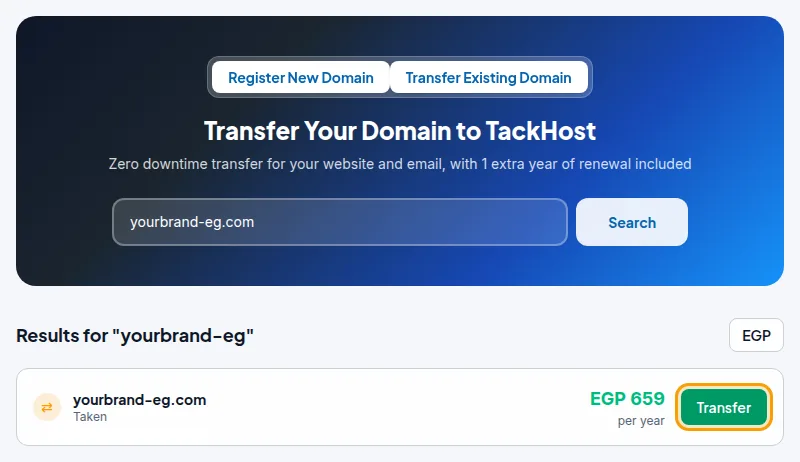
- On the order page, check the Domain Name and paste the code into Transfer Auth/EPP Code.
- Click Checkout, review your cart, accept the terms and click Checkout again, then pay the invoice. See Pay an invoice.

3. Follow the transfer
After your payment is confirmed, we send the transfer request to the registry and email you that the transfer has started.
- In the portal, under Domains, the domain shows Transfer in Progress.
- Open it with Manage to see the Domain transfer progress: Request Submitted, Sent to Registry, Awaiting Release by Current Registrar, and Transfer Completed.
- Approve the confirmation email from your current registrar if you receive one. This is the most common reason a transfer waits.
A transfer usually completes in 5 to 7 days. When it is done, we email you and the domain shows as Active. You can then manage it from the portal. See Manage your domain.
If the transfer fails
The domain then shows Transfer Failed - Action Needed, and we email you the reason. The usual causes are:
- the domain was still locked at the old registrar,
- the authorization code was wrong or expired,
- the confirmation email was not approved in time.
Fix the cause at your old registrar, then open the domain with Manage. Under Resubmit Transfer with Updated EPP Code, paste the new code and click Resubmit Transfer Now. You do not need to place a new order.
Good to know
- Your nameservers stay as they are during and after the transfer. When you want the domain to use your TackHost hosting, follow Point your domain to TackHost, or switch to the TackHost nameservers from Nameservers on the domain's page.
- The transfer price for each extension is in the Transfer column of the Domain Pricing table on the Domain Registration page.
- Some extensions cannot be transferred, or follow different rules (for example some country domains). If you are not sure, ask us before you order.
- If you only want to use a domain with your TackHost hosting, a transfer is not required: you can keep it at your current registrar and point it to us. See Point your domain to TackHost.
Need help with a transfer? Open a support ticket and we will follow it with you.